¶ Project Definition
¶ Usage
The Project Definition screen is the primary interface for managing and tracking client-related projects.
It allows you to view a list of existing projects, add new ones, edit or delete current projects, and export data for reporting or analysis.
This screen provides an efficient way to organize and monitor project progress and related client activities.
¶ Display Fields
When you open the “Project Definition” screen, you’ll see a list of all defined projects in the system. Each project record includes:
-
Customer Code:
A unique identifier for the customer associated with the project. -
Name:
The name of the project (e.g., Inventory Management System for Company X, Cooling Systems Supply and Installation Project). -
Customer Name:
The full name of the customer to whom the project belongs. -
Actions:
Allows direct actions on a project record:- Details: Displays detailed project information not visible in the main list.
- Edit: Opens a form for updating the project’s data.
- Delete: Removes the project from the system (use with caution).
- Export: Exports the displayed project list (or all projects) to Excel or PDF for analysis or documentation.
Note: A new configuration for cost centers and service items has been added, allowing users to link financial transactions or items to specific cost centers for accurate tracking of expenses and revenues.
¶ Fields after Clicking “Add New Project”
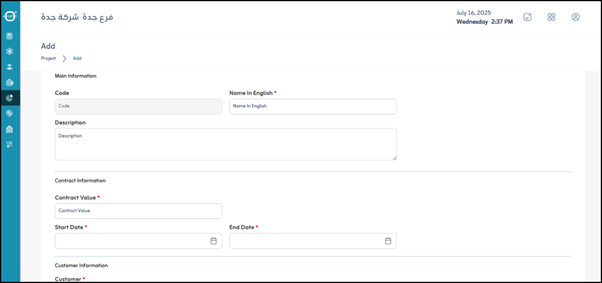
When adding a new project, the system displays input fields for entering project details. Mandatory fields are marked with *.
-
Client Code:
Enter or select the code of the client this project belongs to. It can be a manual field or a dropdown list. -
*Name :
The name of the new project. (Required) -
Description:
Optional field for adding a detailed description, objectives, or scope of the project. -
*Contract Value :
The total value of the contract or estimated project cost. (Numeric, required) -
*Start Date :
The expected or actual start date of the project. (Required) -
*End Date :
The expected end date of the project. (Required) -
Client:
The client’s name associated with the project. This may auto-fill when selecting a Client Code to prevent duplication.
¶ Actions
- Save:
After filling in the project data, click “Save” to store the project details in the system.